# 文档输入输出接口开发指南
所有格式以 `HtmlDocument` 为交换数据。输入端负责读取源内容、渲染模板和生成章节
HTML;输出端负责格式转换、资源处理与写入文件。公共入口是
[`document/mod.ts`](../document/mod.ts)。
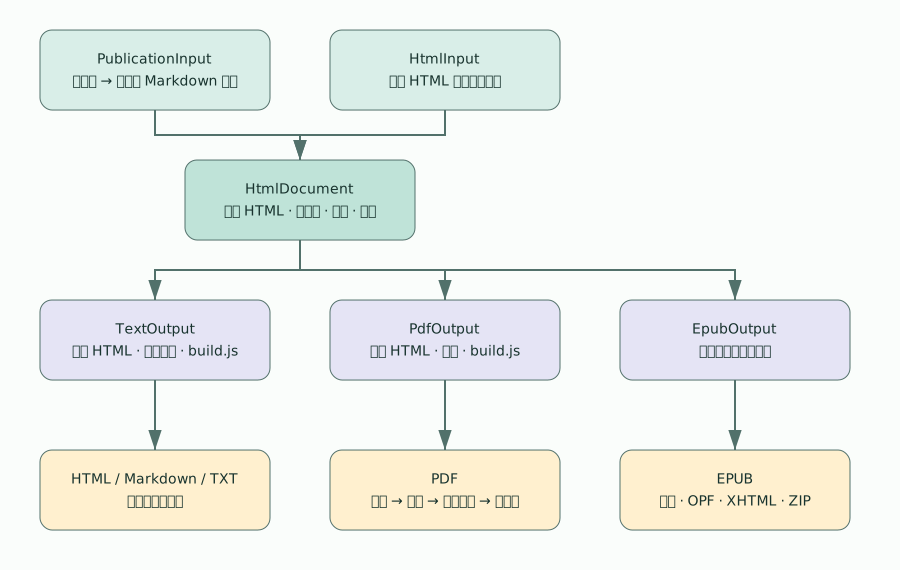
[编辑 draw.io 源图](diagrams/document-workflow.drawio)。SVG
是文档预览,修改图后应同步更新预览。
## 接口契约
```ts
interface DocumentInput {
read(): Promise;
}
interface DocumentOutput {
write(document: HtmlDocument): Promise;
}
interface OutputResult {
readonly path: string;
readonly mediaType: string;
}
```
`convertDocument(input, output)` 依次调用 `read()` 和 `write()`,返回写入结果。
错误直接向调用方传播;输出端应在 `finally` 中释放浏览器等资源。
接口没有流式读取、进度、取消或多文件返回协议;需要这些能力时应显式扩展契约。
## HTML 中间文档
完整类型见 [`document/types.ts`](../document/types.ts)。
| 字段 | 含义与约定 |
| --------------- | ------------------------------------------------------------- |
| `kind` | 固定为 `"html"` |
| `metadata` | `title`、`author`、`language`,可选 `identifier` |
| `baseDirectory` | 出版物绝对目录,供资源边界和路径解析使用 |
| `assetBase` | 共享资源目录;`PublicationInput` 会将其规范为绝对文件系统路径 |
| `chapters` | 已排序的章节数组;数组顺序就是输出顺序 |
| `layout` | `cover`、`styles`、`before`、`after` 四个 HTML 字符串 |
每个 `HtmlChapter` 包含唯一 `id`、`title`、`html`、绝对 `sourcePath`、文章
`index`,以及 `column: { name, index }`。`html` 是章节片段,保留原始资源引用,
不含 PDF 临时定位链接。`sourcePath` 为 EPUB 相对图片、章节链接提供解析基址,
即使输入并非 Markdown,也应提供有意义的来源路径。
`readonly` 是 TypeScript
的编译期约束,不会在运行时冻结对象。输出实现不得修改输入,
需要加工时建立局部字符串或复制数据。同一份文档可顺序交给多个输出端。 当前 PDF
标记编号仍按章节数组的顺序生成,尚未直接使用 `chapter.id`;标题索引仍以 标题为
Map 键,因此不同文章重名仍是现有索引的限制。
## 使用现有输入输出
以下示例放在 `tools/gp/` 下运行,`config` 和 `variables` 由调用方提供:
```ts
import {
convertDocument,
EpubOutput,
PublicationInput,
TextOutput,
} from "./document/mod.ts";
await convertDocument(
new PublicationInput(config, variables),
new TextOutput(config, "html"),
);
// 复用同一份 HTML,避免重复读取和渲染。
const document = await new PublicationInput(config, variables).read();
await new TextOutput(config, "md").write(document);
await new EpubOutput(config).write(document);
```
| 实现 | 处理方式 |
| -------------------------------------------------- | -------------------------------------------------------------------- |
| `PublicationInput(config, variables)` | 使用 PFiles 排序并读取出版物;渲染模板和 Markdown,生成章节 HTML |
| `HtmlInput(document)` | 直接返回调用方传入的中间文档,不读取出版物 |
| `TextOutput(config, "html" / "md" / "txt", path?)` | 组装 HTML、嵌入本地章节图片、执行 build.js,按需转为 Markdown 或 TXT |
| `PdfOutput(config, options?)` | 浏览器排版、可选目录、清理定位标记、书签、可选 qpdf 和签名 |
| `EpubOutput(config, path?)` | 从章节 HTML 生成 XHTML,重写章节链接、打包本地资源并生成 EPUB 导航 |
PDF 配置类型为 `GPConfig`,扩展共享 `DocumentConfig`,包含 `pdf` 和
`playwright`;导出选项见 `PDFPipelineOptions`。CLI 的 PDF Worker
使用同一组接口。 旧 `DocuBuilder` / `EpubBuilder`
方法保留作兼容入口,新扩展优先使用公共接口。
输出路径可使用 `md.path`、`html.path`、`txt.path`、`epub.path` 或
`playwright.path`。HTML/TXT 未单独配置时从 `md.path` 或 `markdown_output`
派生,EPUB 也有兼容回退路径。转换器本身不选择路径,由输出适配器负责。
## 实现新的输入
例如接入数据库、远程接口或已有 HTML 文件时,实现 `read()` 并生成章节结构:
```ts
import type { DocumentInput, HtmlDocument } from "./document/mod.ts";
class ArticleHtmlInput implements DocumentInput {
constructor(private readonly root: string) {}
async read(): Promise {
return {
kind: "html",
metadata: { title: "示例刊物", author: "编辑部", language: "zh-CN" },
baseDirectory: this.root,
assetBase: `${this.root}/assets`,
chapters: [{
id: "article-1",
title: "示例文章",
html: await Deno.readTextFile(`${this.root}/article.html`),
sourcePath: `${this.root}/article.html`,
index: 1,
column: { name: "示例专栏", index: 1 },
}],
layout: { cover: "", styles: "", before: "", after: "" },
};
}
}
```
`root` 应为绝对路径。输入负责确认章节顺序、ID
唯一性和元数据完整性;当前公共流水线 不提供运行时 schema
校验。模板变量应在输入阶段解析一次,不要让新输出再次解释源模板。
## 实现新的输出
新输出只依赖中间文档,不应重新读取出版物 Markdown:
```ts
import type {
DocumentOutput,
HtmlDocument,
OutputResult,
} from "./document/mod.ts";
class ChapterJsonOutput implements DocumentOutput {
constructor(private readonly path: string) {}
async write(document: HtmlDocument): Promise {
await Deno.writeTextFile(
this.path,
JSON.stringify(document.chapters, null, 2),
);
return { path: this.path, mediaType: "application/json" };
}
}
```
此示例要求父目录已存在。生产实现应负责创建输出目录、处理资源路径、释放资源,
并将失败抛给调用方。如果需要 CLI 子命令,再接入 `cli/handlers.ts` 和
`cli/match.ts`; 无需调整其他输出实现。
## 资源与脚本边界
本地章节图片在文本和 PDF 组装阶段按共享资源基址嵌入;远程 URL 保持原样。 EPUB
根据章节来源路径和共享资源目录打包本地文件,远程资源当前不自动下载。
封面、字体和附加布局 HTML 不一定经过相同的章节图片嵌入逻辑。
EPUB 当前只消费章节和元数据,不复用 PDF 布局,也不执行 build.js。
PDF、HTML、Markdown、TXT 的脚本阶段详见 [build.js 开发指南](build-js.md)。
## 验证
在 `tools/gp/` 运行:
```sh
nix develop -c deno test -A document/document_test.ts
nix develop -c deno check document/mod.ts main.ts pdf_builder/worker.ts
```
新增输入应验证排序、变量与资源基址;新增输出应使用内存构造的 `HtmlDocument`
验证内容、路径、媒体类型以及输入未被修改。PDF / EPUB
的资源和索引变更还应运行相应测试。